AI music videos are interesting because musicians already think visually. A song has mood, pacing, imagery, and narrative even before a camera appears. AI gives artists a way to explore those visuals without a traditional production budget.
The challenge is taste. A music video cannot just be a stream of surreal clips. It needs a visual idea that supports the song: character, atmosphere, performance, symbolism, movement, or a world the audience wants to revisit.
AI changes the release workflow
That does not mean every artist needs a fully generated music video. The smarter use is layered: cover-art animation, teaser loops, Spotify Canvas-style clips, lyric sections, live-show backdrops, Shorts/Reels/TikTok hooks, and a few polished hero visuals.
Formats that work
- Looping visualizers for choruses.
- Lyric clips for the most quotable line.
- Mood films for pre-save campaigns.
- Vertical snippets for TikTok/Reels/Shorts.
- Animated cover art.
- Fan-safe remix templates.
- Concert backdrop visuals.
- Behind-the-song explainers with avatar or voiceover.
Do not let the visuals fight the song
The easiest AI mistake is over-imagery: every beat becomes a new universe, every lyric becomes literal, and the video feels like a demo reel. Pick one visual thesis. A lonely synth track does not need dragons, chrome cities, and melting clocks unless that is truly the artist world.
Use AI to explore directions, then edit like a human with taste.
Rights and disclosure
Do not generate celebrity lookalikes, copyrighted characters, or brand logos you do not have rights to use. If the video includes realistic synthetic people or altered footage, platform disclosure rules may apply.
A practical AI music videos workflow
Start with one piece of the release. Not a full music video on day one. Not a vague “drop some AI clips.” One asset — say, the chorus visualizer.
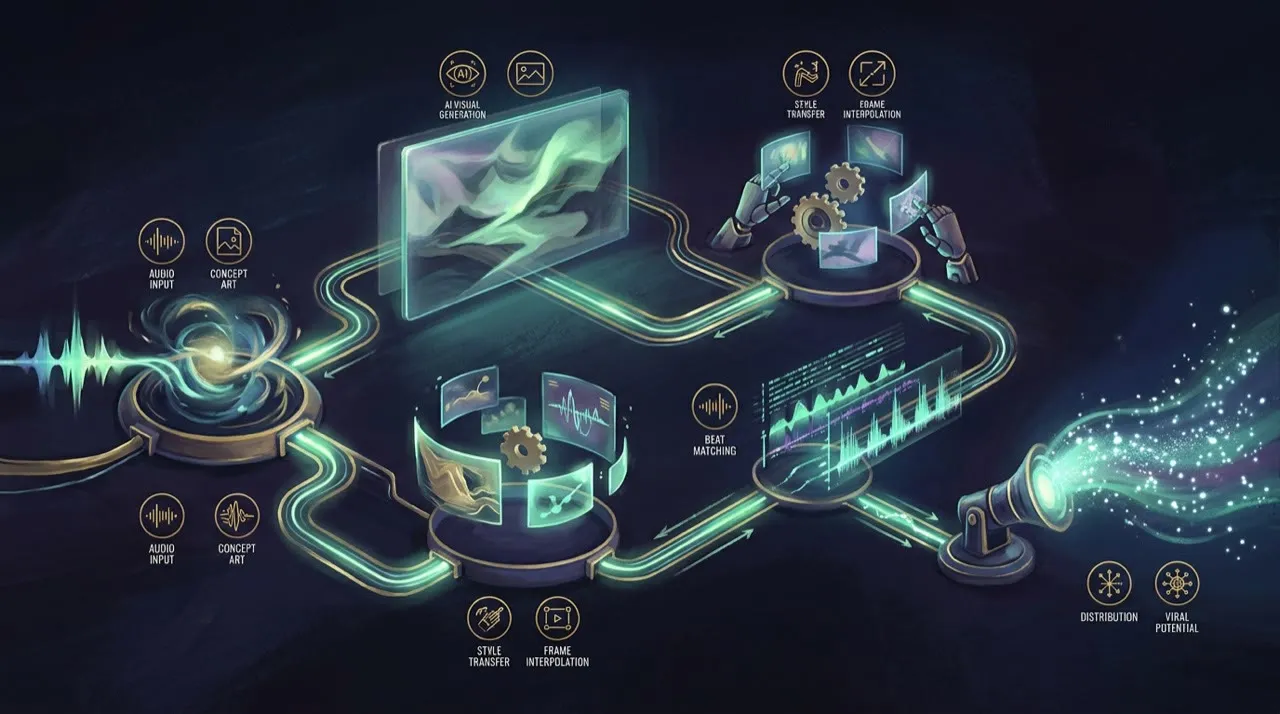
Pin down the song section, the feeling it carries, the single image that represents it, and the platform it lands on first. Then sketch three opening visuals and one shot list. Generate scenes only after the shot list is set. Cut the first version, then build two alternate edits with different pacing. Post it, watch the saves and rewatches, and rebuild the strongest cut with a tighter first beat.
That is the rhythm of an AI music-video release:
- Song section
- Visual thesis
- Opening image
- Shot list
- Generation
- Edit
- Alternate cut
- Publish
- Measure
- Rebuild
Most artists stall because they generate clips before deciding what the track actually looks like. It feels productive, but it leaves you with a folder of pretty footage and no visual through-line tying it to the song.
The pre-publish quality bar
Before a music video or visualizer goes live, check it against five questions:
- Does the visual serve the song instead of competing with it?
- Is the song, samples, and any depicted likeness actually cleared?
- Does the first three seconds give a scrolling viewer a reason to stop?
- Is the visual world consistent enough to feel like one release, not random clips?
- If the platform requires AI disclosure, is it labeled?
A finished render is not permission to release it, no matter how done it looks. AI can remove the production budget. It cannot give the video taste or clear the rights for you.
Common mistakes
The thing that sinks most AI music videos is not the model. It is generating scenes before the song has a visual identity.
Mistake one: rendering clips before the visual thesis is decided. This buries the track under footage that never agrees with itself.
Mistake two: chasing one flawless hero video instead of testing several opening visuals and loop ideas against the chorus.
Mistake three: letting the model dictate the look. AI can animate cover art and invent worlds, but it cannot know what your song means, what your fans recognize you for, or what likeness and samples you have cleared unless you decide those first.
Mistake four: posting one master cut to every platform. A YouTube hero visualizer, a vertical TikTok loop, a Reels lyric snippet, and a Spotify Canvas need different aspect ratios, lengths, captions, and opening frames.
Mistake five: hitting publish before a final rights-and-look pass. That last review should check rights clearance, AI disclosure, color and motif consistency, lyric timing, and whether the visual actually makes the song more memorable.
A stronger next step
Pick one thing the song already gives you: the cover art, the most-quoted lyric, a recurring motif, the chorus melody, or the mood of the opening line. Turn that into one visual concept with three different opening shots. Do not start from a blank prompt. Start from the song.
That keeps the AI anchored to your release instead of drifting into generic surreal imagery, and it gives you something postable immediately.
Final pre-publish checklist
Before the visualizer or release clip goes live, run one last pass that is harsher than the first edit.
Check the visuals against the song. If the chorus lifts, the imagery should lift with it. If a line is the emotional core, the shot under it should not be a throwaway. If the world is supposed to feel cohesive, no single scene should look like it wandered in from a different track. Watch it once with the volume off, then once with the visuals dimmed — the two should still feel like the same release.
Then check the rights. Every depicted face, sampled stem, logo in frame, font on a lyric card, and stock element should trace back to something you control or cleared. If a likeness or sample cannot be cleared, cut it or replace it before publish, not after a strike. Do not let a striking shot survive just because it looks good.
Finally, check the hook. A scrolling listener should have a reason to stay in the first three seconds: motion, a face, a lyric on screen, or a color that pops. If the opening frame does not earn the next one, recut the front of the video before you post it.
A release campaign workflow
Use AI music videos as a campaign, not a single asset.
Two weeks before release, create a 6-second visual loop for the hook. One week before release, publish a lyric teaser built around the most memorable line. On release day, drop the full visualizer or hero clip. After release, turn the chorus, bridge, and strongest fan-comment moments into short-form variants.
Each asset should feel like the same world. Same colors. Same visual language. Same emotional temperature. That consistency matters more than generating a new style for every clip.
The goal is not to make the internet say “AI made this.” The goal is to make the song easier to remember.
One last practical note
Do not wait for the perfect music-video concept. Pick one song section, one feeling, and one format — a chorus loop, a single lyric card, an animated cover. Make the first version simple enough to actually finish and post. Then sharpen the next cut using what the saves, shares, and rewatch rate tell you.
That is the advantage AI gives an artist: you can test what the song looks like in public before committing budget to a full video. Use it.
Start from the song, not the model
Play the track on loop and map it before you open any model. Where does the energy turn? Where does the hook land? What single image belongs to the first line? Which visual should repeat with the chorus, and which should evolve verse to verse?
Then lock a visual system: a color palette, a recurring subject, a setting, a kind of motion, and one motif that ties it together. AI can generate scenes, animate your cover art, build lyric clips, and test directions in minutes. But the artist still has to decide what the song looks like. Skip that decision and the visualizer becomes a screensaver running under your music.
Where Vivideo fits for music artists
For a release, Vivideo lets you work the way the song demands: an agentic AI chat can plan a full visualizer or lyric sequence with you, one-prompt generation spins up quick teaser loops to test a hook, and manual mode gives you frame-level control when a hero shot has to be exact. Brand kits keep colors and motifs consistent across the cover-art animation, vertical snippets, and main video so the whole campaign reads as one world, while AI voices and templates speed up behind-the-song clips. API/CLI/MCP access is there when you want to batch out the short-form variants.
AI music videos: rights clearance comes before aesthetics
Music videos sit at the intersection of several rights: sound recording, composition, performance, likeness, samples, footage, fonts, artwork, and platform terms. AI does not erase those rights. It can make the clearance problem less visible, which is worse.
Before publishing an AI music video, check:
- Do you control or have permission for the song?
- Are samples, stems, and remixes cleared?
- Are any generated visuals imitating a living artist, actor, or private person?
- Are logos, characters, or brand marks appearing accidentally?
- Does the platform require AI disclosure?
- Can you prove what tools and prompts were used if a dispute appears?
Artists can use AI brilliantly for lyric visuals, surreal worlds, tour teasers, Spotify canvases, vertical clips, animated cover art, and fan-engagement variants. But virality built on stolen style or uncleared likeness is fragile.
The smarter move is to make AI part of the art direction: a consistent visual world, repeatable motifs, and short clips that invite remixing without creating rights chaos.
Conclusion
AI music videos work best when they are tied to a real song, a real visual idea, and a real release plan. AI can remove the production budget, but it cannot decide what your track looks like or clear the rights that keep a viral moment from collapsing.
Use this as a filter for every clip: it should serve the song, hold one consistent visual world, clear its likeness and samples, hook a scrolling listener in three seconds, and carry the AI label where the platform requires it. That is how AI becomes art direction instead of noise.
If you want one place to plan a visualizer, generate teaser loops, animate cover art, keep colors and motifs consistent across the campaign, and batch out the short-form variants, you can start free at vivideo.ai.